





If you have been waiting to switch on "Instant Checkout" so shoppers can buy your products without leaving ChatGPT, stop waiting. That feature is no longer the plan.
OpenAI has retired the standalone Instant Checkout experience, and Shopify now treats ChatGPT as a discovery channel: the AI finds and recommends your product, then sends the shopper to your own store to pay. The setting you are looking for does not exist, and the work that actually matters has moved somewhere else — into your product data and your product page.
The short version
- Instant Checkout in ChatGPT is gone. OpenAI says it is "moving away from a standalone Instant Checkout experience in ChatGPT."
- ChatGPT now sends buyers to your checkout. Shopify calls it "a discovery-focused referrer platform" — the sale closes on your online store, with your branding and your payment methods.
- There is no ChatGPT checkout toggle to find. Shopify states plainly that "there's no option to activate or deactivate a ChatGPT direct checkout setting in your Shopify admin."
- It is opt-out, not opt-in. Agentic Storefronts is "active by default for eligible stores," and turning catalog access off takes up to 7 days to take effect.
- No extra fees. Shopify: "There are no fees associated with selling in ChatGPT." OpenAI: "There are no fees on purchases that start in ChatGPT."
- The lever that is left is your listing and your page — title, description, images, variants, policies, and the product page the shopper lands on.
What actually happened to Instant Checkout
In September 2025 OpenAI launched Instant Checkout, built on the Agentic Commerce Protocol with Stripe, and announced that Shopify merchants would follow Etsy onto it. For a while, buying inside the chat window looked like the destination everyone was heading toward.
It is not where things landed. OpenAI's current merchant FAQ answers the question "Can users buy directly inside ChatGPT?" like this: "We're moving away from a standalone Instant Checkout experience in ChatGPT and prioritizing better shopping discovery and merchant-owned checkout experiences. Users can discover and evaluate products in ChatGPT, but purchases are completed on merchant-owned websites or apps." OpenAI's old Instant Checkout help article now returns a 404.
Shopify's side of the story is the same, in different words. Its ChatGPT help page describes the channel as one where "ChatGPT users complete their purchase on your online store checkout in a ChatGPT in-app browser, or in a new tab when customers use ChatGPT web." The umbrella feature is called Agentic Storefronts, and it covers more than one AI channel. If you have been reading about this under the name "agentic commerce," our guide to selling through AI assistants covers the wider picture; this article is specifically about what replaced the in-chat checkout.
This is good news more often than it is bad. A shopper who lands on your checkout is a shopper whose email, discount logic, upsells, and post-purchase flow are still yours — the same argument we made about letting traffic decide which page it lands on.
Where the checkout actually happens, channel by channel
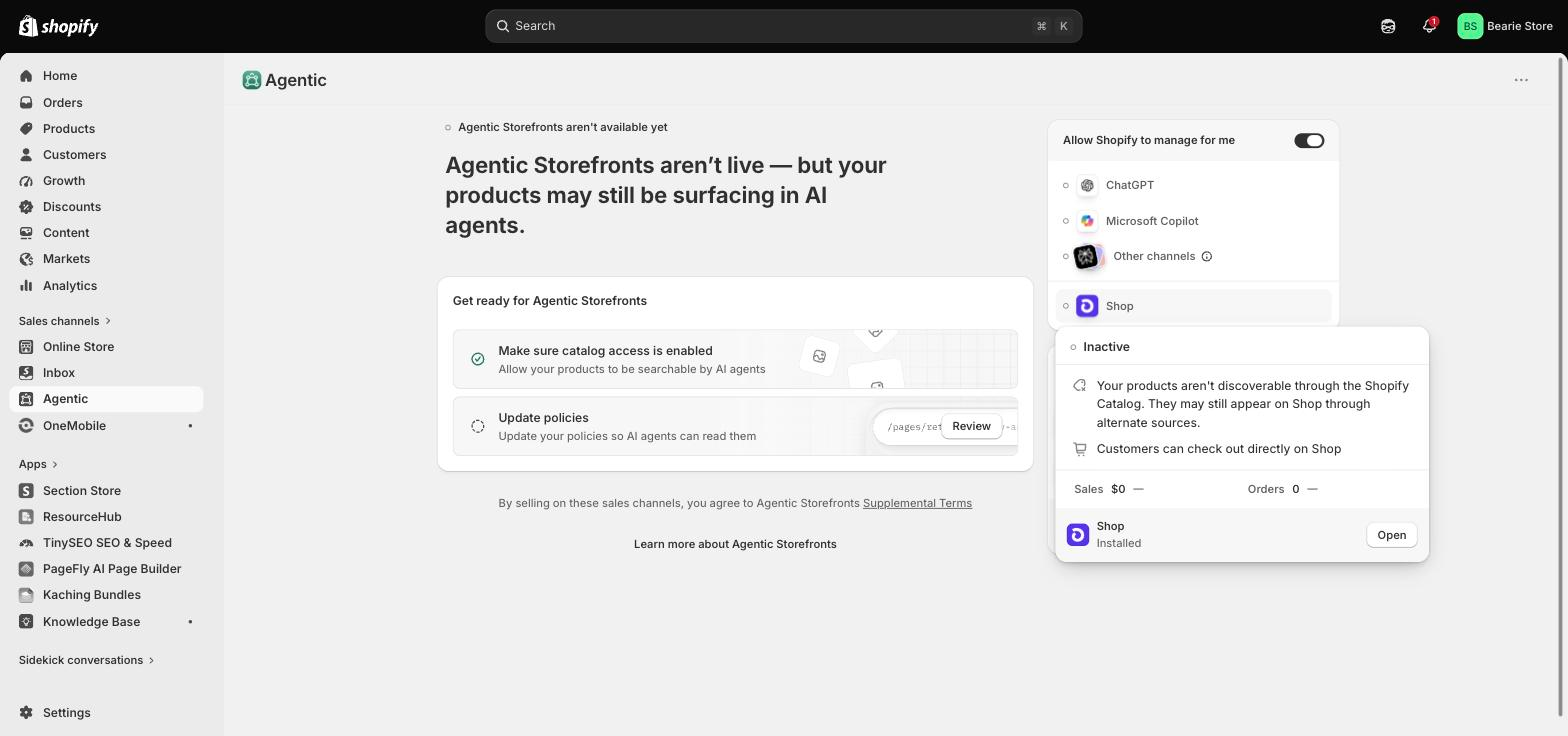
The single most useful thing to understand is that Shopify states the checkout location per channel, as a fact you cannot configure. Open the channel detail in your admin and it tells you where the money changes hands.
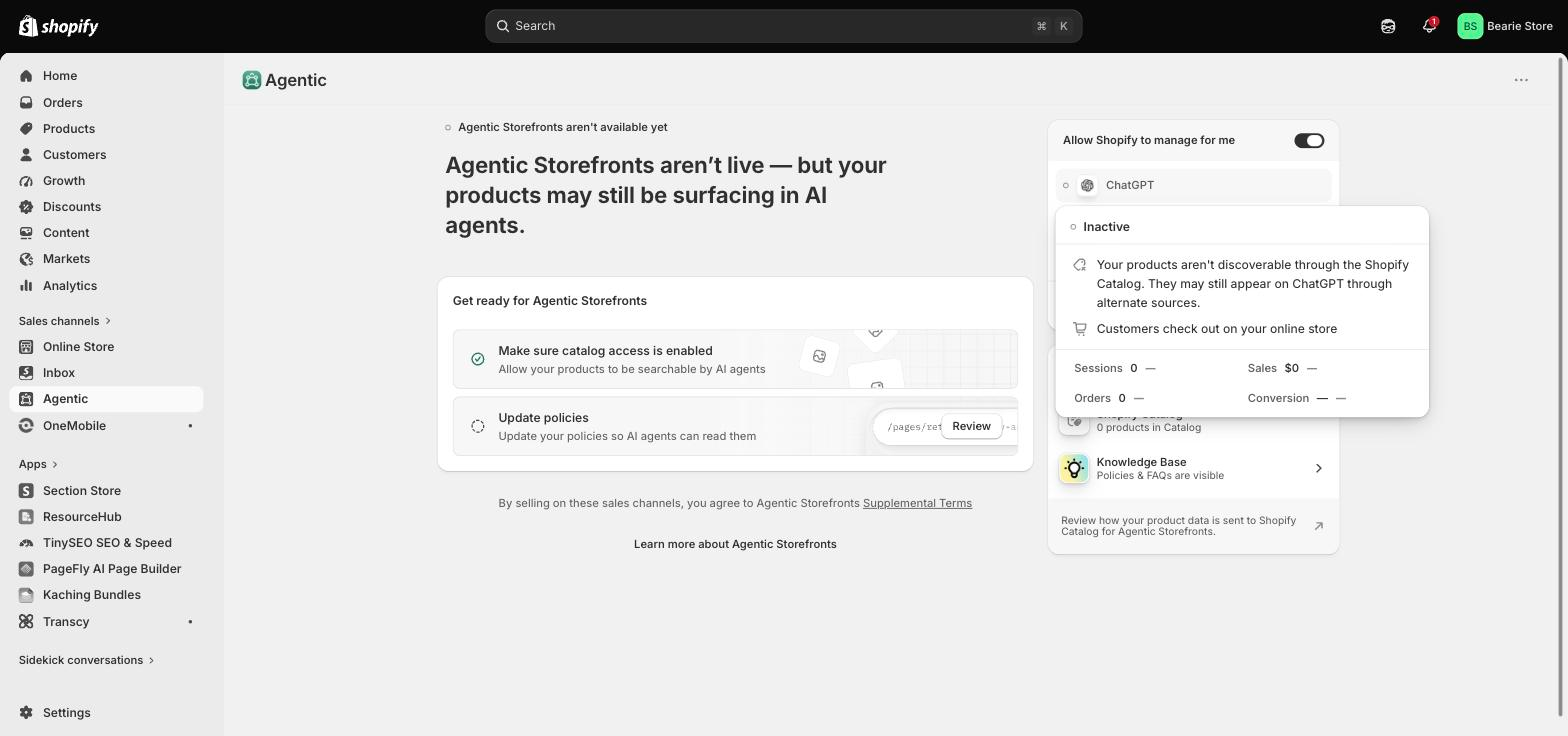
Compare that with the Shop channel on the same screen, which says the opposite in the same place:
| チャンネル | Who takes the payment | What you control |
|---|---|---|
| チャットGPT | You — the shopper is handed to your Shopify checkout | Everything: branding, payment methods, discounts, upsells |
| ショップ | Checkout completes inside Shop | Product data and catalog access |
| Microsoft Copilot | Direct checkout inside the chat, where supported | Product data; several checkout features are unsupported |
| Other channels (e.g. Perplexity) | Varies by channel | Catalog access, via a single group toggle |
Two caveats worth saying out loud. First, where a channel does support in-chat checkout, you give things up: for Copilot, Shopify lists subscriptions, bundles, customizable products, B2B-only products, local delivery and in-store pickup as unsupported, and notes that Google Analytics and custom pixels do not fire client-side. Second, the exact channel list in your admin depends on what has rolled out to your store — Shopify's documentation describes Google AI Mode and Gemini, Copilot and Meta alongside ChatGPT, but you will only see what your store is currently eligible for.
How to check what your store is doing right now
Because this is on by default, the useful question is not "how do I enable it" but "what is already being shared, and do I agree with it." Here is the check, in the order that surfaces problems fastest.
- Open Sales channels → Agentic in your Shopify admin. The direct URL is
admin.shopify.com/apps/agentic. You need to be the store owner, or have the Products → View and App and sales channel → Agentic permissions. - Read the status line at the top before you touch anything. It tells you whether Agentic Storefronts is live for your store or still pending — and if it is pending, your products may still be surfacing in AI answers through other routes.
- Look at "Allow Shopify to manage for me." While this master toggle is on, every supported channel gets catalog access and you are auto-enrolled into new channels as they launch. Turning it off is what reveals the per-channel switches.
- Check your policies. Shopify requires Terms of service, Privacy policy, and Return and refund policy to be filled in under Settings → Policies. This is also a ranking signal, not just a legal box.
- Look at the Sources panel. It shows how many products are in Shopify Catalog and whether your Knowledge Base policies and FAQs are visible to agents. Zero products in Catalog is the single most common reason a store is invisible to AI channels.
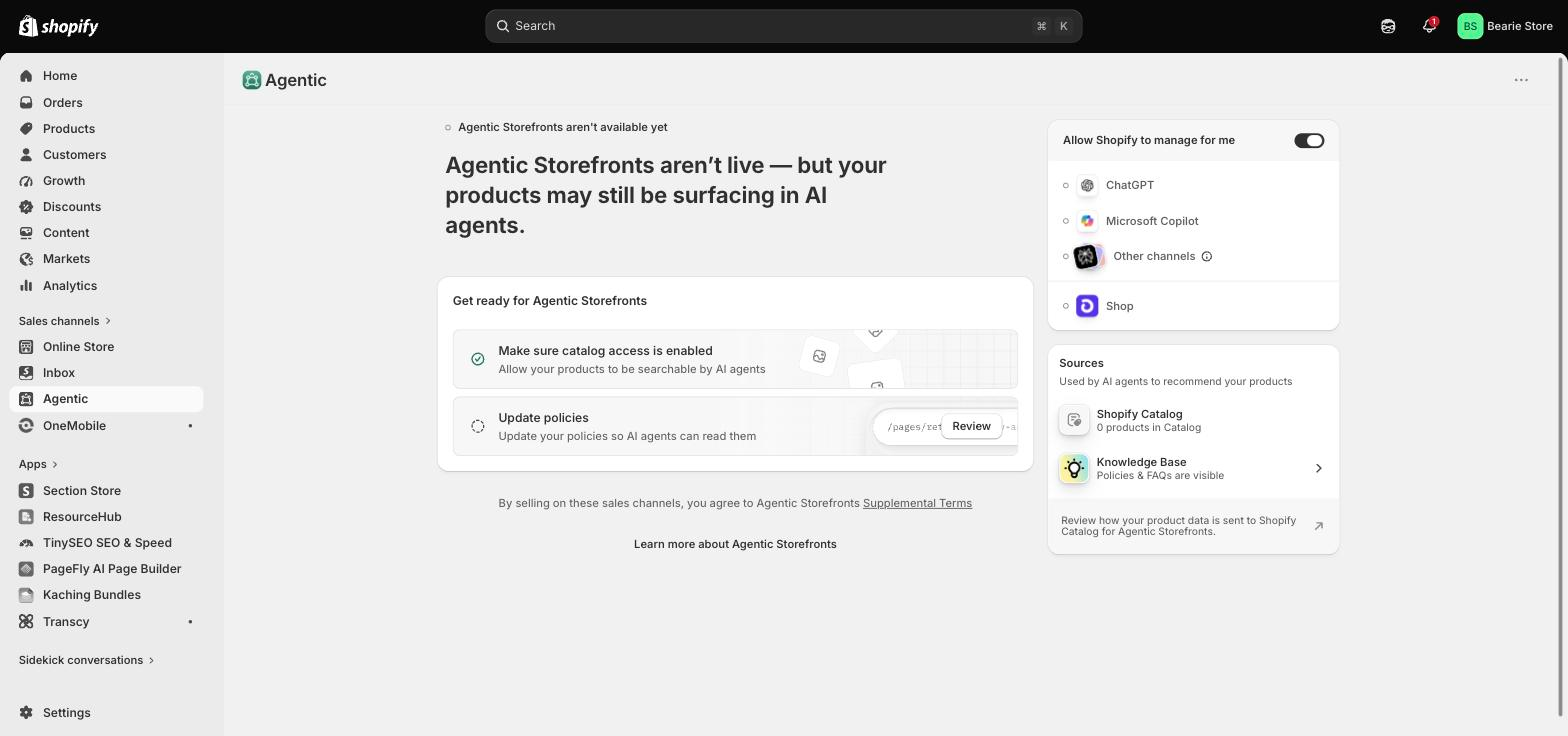
If you want to opt out of ChatGPT specifically: turn off "Allow Shopify to manage for me," open the ChatGPT channel, turn off Shopify Catalog access, and save. Shopify warns that "it can take up to 7 days before your product data is no longer being shared," so this is not an instant switch, and for most merchants it is the wrong move anyway.
What eligibility actually requires
Shopify publishes the requirements, and they are more about housekeeping than about your plan. Your store must sell to customers in the United States, though the store itself can be based anywhere. Products must be eligible for Shopify Catalog, which means a Starter plan or higher, a store that is not password-protected, and per product: a title, at least one image, a price greater than zero, and a real, indexable product URL. Products marked Unlisted or hidden from search engines are excluded.
Beyond that, Shopify checks account standing — verified email, two-factor authentication, genuine sales history, prompt fulfilment, a low chargeback rate, invoices paid on time. The pattern is clear: agent surfaces are being gated on trust signals, not on how much you spend. If you are still sorting out the basics of your store setup, our walkthrough of how Shopify pages work is a better first stop than this one, and the same trust logic governs onsite search and discovery inside your own store.
The listing signals that decide whether you get recommended
Once your catalog is flowing, the competition is not for a checkout button. It is for being the product the assistant names. Shopify's own optimization guidance points at a specific field list: title, description, images, product type, vendor, collections, tags, barcode (ISBN/UPC/GTIN), and variants including option names.
Shopify also documents a listing-quality assessment built from five signals, which is the most concrete checklist available:
- Description completeness — measured on word count. Thin descriptions lose.
- Image coverage — measured on the number of product images.
- Product reviews — average rating and review count, counted "only from reviews that are verified by trusted sources."
- Variant and option completeness — including whether your option names "contain acronyms or numbers that are hard for agents to understand or recommend."
- Shop policy completeness — shipping, returns, refunds and the rest.
That fourth one is the quiet killer. A variant called "CLR-02 / SZ-M" is fine for a human staring at a swatch and meaningless to an assistant trying to say "the medium in sage green." Rewriting option names is unglamorous, cheap, and probably the highest-return hour you will spend on this. If you want a sense of how differently assistants read a store, our comparison of Sidekick, ChatGPT and Claude is a useful calibration.
Two other mechanics are worth knowing. Legal disclosures must appear in the first 6,000 characters of the product description, or they may not be picked up. And every Shopify store now automatically serves an /agents.md file alongside llms.txt そして llms-full.txt — you do not need an app to generate them, and you can override them with theme templates. Blocking crawlers in robots.txt does not remove you from Catalog syndication; those are separate pipes. If you want to go deeper on being quotable rather than merely crawlable, we wrote about getting recommended by AI search and about what AI agents actually do with a storefront.
Shopify reports that "AI searches powered by Shopify Catalog convert at 2x the rate of those using scraped data," which is the clearest published argument for leaving catalog access on rather than trying to control the narrative through your own site alone. The same discipline applies to the content you publish around the store, which is why we treat answer engine optimization as a sibling of catalog hygiene rather than a separate channel.
What this means for your product page
Here is the boundary, stated first: a page builder does not get you recommended. Catalog data does that, and none of it lives on your page template.
But the handoff is the whole point of the new model. The assistant does the discovery, then drops a motivated, pre-qualified shopper onto your product page — often inside an in-app browser on a phone, arriving cold, with no session history and no browsing context. That page now carries the entire conversion job that the chat used to share. Every weakness it has is amplified: slow hero images, a size guide three taps away, trust signals below the fold, a shipping promise that never appears before the add-to-cart.
Shopify's Knowledge Base app makes the gap visible in a way that transfers directly to your page: it lists the questions shoppers are asking that your store has not answered.
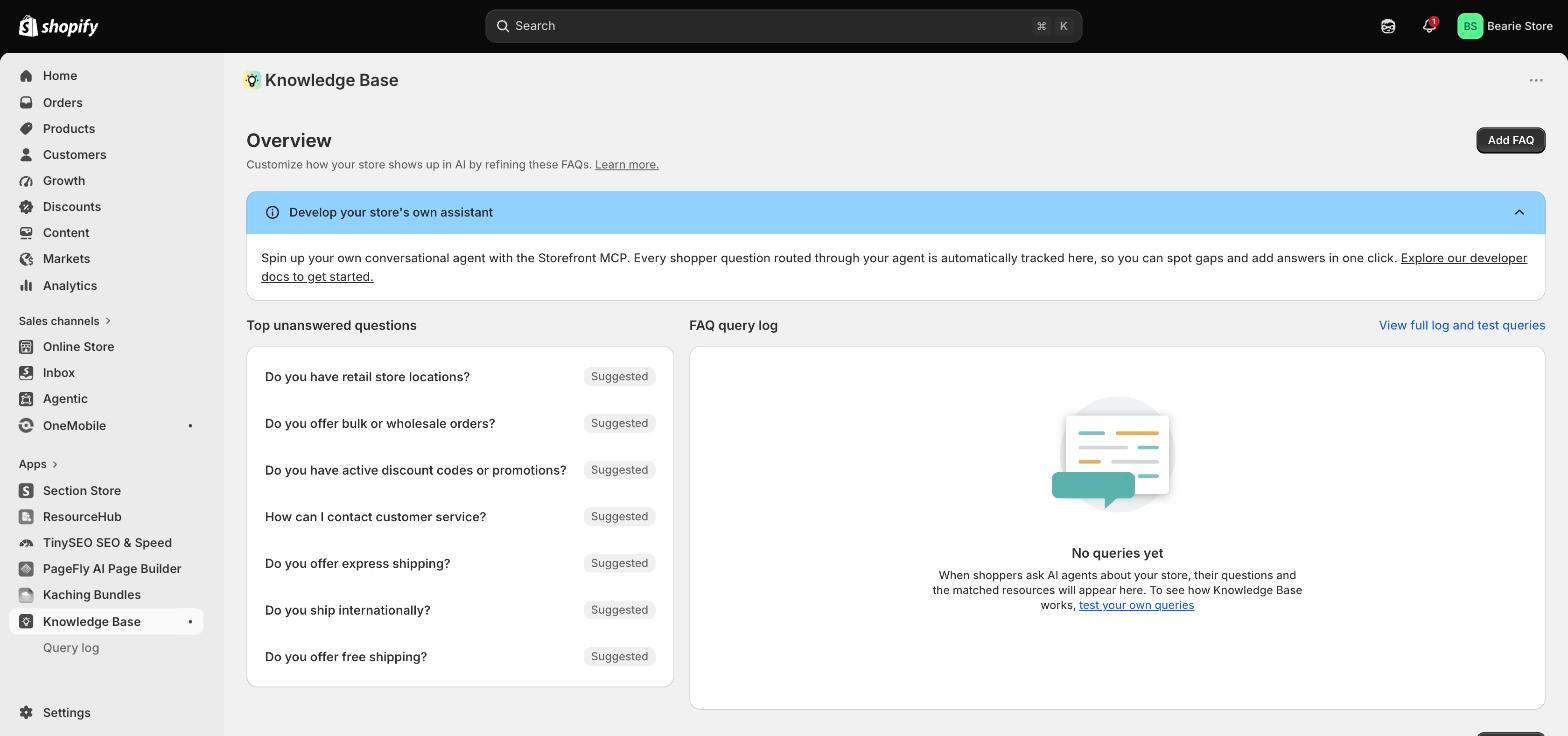
Three things are worth auditing on the pages your AI traffic is most likely to hit. First, does the page restate the thing the assistant just promised — the material, the fit, the compatibility — in the first screen, so the shopper does not have to re-verify it? Second, does it survive a mobile in-app browser, which is narrower and slower than the phone browser you test in? Third, does it answer the objection that the assistant could not: returns, delivery window, sizing. Our roundup of product pages that convert has concrete patterns for all three.
If you would rather start from something proven than a blank canvas, the PageFly template library covers the common product-page shapes.
For the measurement side of it, our CRO resources are the practical starting point.
And if you are rebuilding pages at volume rather than one at a time, the AI page builder is the faster route.
And because the checkout is now yours again, what you can change at checkout matters more than it did six months ago — what each Shopify plan lets you change at checkout is the companion piece to this one. If you are heading into peak season, fold the listing-quality pass into your BFCM preparation rather than treating it as a separate project.
What to do this week
Open Sales channels → Agentic and confirm your product count in Catalog is not zero. Fill in any missing store policy. Then pick your twenty best-selling products and read their variant option names out loud — if you cannot say one as a sentence, an assistant cannot either. That is the whole job this week; the rest is your product page, which was always the job.
Shopify Instant Checkout FAQ
Is Shopify Instant Checkout still available?
No. Instant Checkout was OpenAI's in-chat buying feature, launched in September 2025. OpenAI has since said it is "moving away from a standalone Instant Checkout experience in ChatGPT," and its help article for the feature no longer exists. Shopify merchants now reach ChatGPT shoppers through Agentic Storefronts, where the purchase completes on the merchant's own store.
How do I turn on Instant Checkout in Shopify?
You cannot, because there is nothing to turn on. Shopify states that "there's no option to activate or deactivate a ChatGPT direct checkout setting in your Shopify admin." What you can control is whether your products are shared with AI channels at all, under Sales channels → Agentic.
Does selling through ChatGPT cost extra?
No. Shopify says "there are no fees associated with selling in ChatGPT" beyond your standard payment processing rates, and OpenAI says "there are no fees on purchases that start in ChatGPT."
Do I still own the customer if the sale starts in ChatGPT?
Yes. Because the checkout happens on your online store, the order is a normal Shopify order and you remain the merchant of record. Shopify confirms that AI channels do not get access to your full order history, orders from other sales channels, or your customer database.
Which countries does this work in?
Shopify requires that your store sells to customers in the United States, although your business can be based elsewhere. OpenAI states that shopping in ChatGPT "is currently live for ChatGPT users in the U.S." and will expand over time.
Is my store included automatically?
Yes, if it is eligible — Shopify says Agentic Storefronts "is active by default for eligible stores." Opting out is a deliberate act, and turning off catalog access can take up to seven days to take effect.
Shopify Instant Checkout FAQ
No. Instant Checkout was OpenAI’s in-chat buying feature, launched in September 2025. OpenAI has since said it is moving away from a standalone Instant Checkout experience in ChatGPT. Shopify merchants now reach ChatGPT shoppers through Agentic Storefronts, where the purchase completes on the merchant’s own store.
You cannot, because there is nothing to turn on. Shopify states that there is no option to activate or deactivate a ChatGPT direct checkout setting in the Shopify admin. What you can control is whether your products are shared with AI channels at all, under Sales channels then Agentic.
No. Shopify says there are no fees associated with selling in ChatGPT beyond your standard payment processing rates, and OpenAI says there are no fees on purchases that start in ChatGPT.
Yes. Because the checkout happens on your online store, the order is a normal Shopify order and you remain the merchant of record. Shopify confirms that AI channels do not get access to your full order history, orders from other sales channels, or your customer database.
Shopify requires that your store sells to customers in the United States, although your business can be based elsewhere. OpenAI states that shopping in ChatGPT is currently live for ChatGPT users in the U.S. and will expand over time.
Yes, if it is eligible. Shopify says Agentic Storefronts is active by default for eligible stores. Opting out is a deliberate act, and turning off catalog access can take up to seven days to take effect.