





Black Friday 2026 lands on November 27. That is about 11 weeks from today, and most of the work that decides how the weekend goes has to happen before the traffic does.
Shopify merchants sold $14.6 billion over the BFCM 2025 weekend, up 27% year over year, peaking at $5.1 million a minute at 12:01 PM EST on Black Friday. More than 94,900 merchants had their highest-selling day ever. None of them fixed their page speed on the Friday.
This is a dated checklist, not a list of tips. It is organised by how many weeks are left, it names the 2026 platform changes that broke things merchants relied on last year, and it covers the one traffic source almost no BFCM guide mentions: AI assistants that now buy on your behalf.
要点
- BFCM 2026 runs Thursday 26 November to Monday 30 November. Black Friday is 27 November, Cyber Monday is 30 November.
- Two things silently broke in 2026. Shopify Scripts stopped executing on 30 June, and script tags on the Thank you and Order status pages were sunset for non-Plus stores on 26 August. Check both before you rely on them.
- Speed is a conversion lever, not a vanity metric. Shopify's own platform data puts every 100 ms of extra load time at roughly 3.5% lower conversion.
- AI assistants are now a checkout surface. Agentic Storefronts is on by default for eligible stores, and generative-AI traffic to retail sites grew 693% year over year last holiday season.
- Freeze your theme before the sale, not during it. Shopify's own top-ranking checklist never tells you to, and it is the cheapest insurance you can buy.
When is BFCM 2026?
BFCM is the five-day retail window that starts on US Thanksgiving and ends on Cyber Monday. In 2026 it falls late in the month, which shortens the gap between the sale and Christmas shipping cutoffs.
| Day | Date |
|---|---|
| Thanksgiving | Thursday, 26 November 2026 |
| ブラックフライデー | Friday, 27 November 2026 |
| スモール・ビジネス・サタデー | Saturday, 28 November 2026 |
| サイバーマンデー | Monday, 30 November 2026 |
Worth knowing: Shopify's own highest-ranking BFCM checklist does not state these dates anywhere in its text. If you have been reading round-ups to work out your timeline, that is why the timeline never appeared.
What changed on Shopify before BFCM 2026
Three platform changes shipped this year that affect a peak-season sale. Two of them removed something you may still be depending on.
Shopify Scripts stopped running on 30 June 2026
Shopify's developer changelog confirms that all Shopify Scripts ceased to execute entirely on 30 June 2026, after editing was disabled on 15 April. If your tiered BFCM discount logic, line-item promotions or shipping-rate rules lived in Scripts, they are not running. Rebuild them as Shopify Functions before you announce an offer that depends on them.
Script tags on Thank you and Order status pages were sunset on 26 August 2026
Per Shopify's checkout.liquid documentation, script tags were sunset on those two pages for Plus stores on 28 August 2025 and for non-Plus stores on 26 August 2026 — two weeks ago. Post-purchase tracking pixels, conversion tags and upsell snippets pasted into the old additional-scripts box no longer run. The replacement is web pixels and checkout app blocks. This one matters twice over: you lose the revenue attribution and the post-purchase offer at exactly the moment both are worth the most. Our guide to what each Shopify plan lets you change at checkout covers what is still editable on your plan.
Discounts got more flexible
Since 15 July 2026 you can combine multiple product discounts on the same line item, which previously was not possible. You tag discounts, set which tags combine, and Shopify applies them automatically. Separately, Rollouts (Basic plans and above, under Markets → Rollouts) lets you schedule a storefront change with an end date so the store reverts itself when the promotion finishes. That removes the classic Monday-morning job of manually undoing everything.
The week-by-week Shopify BFCM checklist
Work backwards from 27 November. The ordering matters more than the list: fixes that need Google to re-crawl, or a courier to confirm, cannot be done in the last fortnight.
| Weeks out | Calendar | フォーカス |
|---|---|---|
| 11–9 | 9月 | Audit 2025 data, fix what broke in 2026, measure speed, cut apps |
| 8–6 | 10月 | Decide the offer, build the pages, confirm shipping cutoffs |
| 5–3 | Early November | Test orders, discount codes, A/B tests, brief support |
| 2–0 | Mid–late November | Freeze the theme, rehearse the kill switch, schedule the revert |
11 to 9 weeks out (September) — fix the foundations
- Pull last year's numbers first. Which pages converted, which traffic source actually paid, where people dropped. Everything below should be aimed by that data, not by a generic list.
- Audit what broke in 2026. Scripts, script tags on Thank you and Order status, and any app that wrote to them. Confirm each replacement works today.
- Measure your Core Web Vitals. They sit on the Online Store page in your Shopify admin. Fix largest contentful paint and interaction to next paint first — see the speed section below for why.
- Audit your app stack. Every app costs milliseconds. Shopify's flash-sales guidance is blunt about shipping apps in particular: they "typically perform poorly during extremely high volume events," and because checkout cannot complete without a shipping rate, Shopify recommends deactivating carrier-calculated rates for the sale and using flat rates instead.
- Lock inventory forecasts with your suppliers while there is still lead time to change them. If demand outruns stock, pre-orders are the controlled way to keep selling.
- Check your plan headroom. Shipping rates, staff accounts and checkout customisation all differ by tier — our breakdown of Shopify pricing plans shows what your current plan allows.
8 to 6 weeks out (October) — build the pages and the offer
- Decide the offer. Sitewide percentage, tiered spend thresholds, bundles, or early access for your list. Then confirm it is actually buildable with native discounts now that Scripts are gone.
- Build your BFCM pages. A dedicated Black Friday landing page outperforms dropping a banner on the homepage, because the page can carry the offer, the countdown and the deal grid without fighting your permanent navigation. If you are unsure which page type you need, landing page vs homepage settles it.
- Sharpen the pages that already get traffic. Your product pages and collection pages will take more BFCM traffic than any new page you build.
- Set up the deal-alert capture now so the list is warm before November. A simple coming-soon landing page collects emails while you finish the offer.
- Confirm shipping cutoffs in writing with each carrier, and publish them on the site. Selling into more than one country makes this harder — Shopify Markets is where per-country rules live.
- Rebuild reusable blocks once. Countdown, offer banner and trust row will appear on several pages; Shopify sections keeps them consistent instead of copy-pasted.
5 to 3 weeks out (early November) — test everything
- Place a real test order end to end, on mobile, with a discount code applied.
- Test every discount code including the combinations, and check the stacking rules behave as intended.
- Trigger an abandoned-checkout email to yourself and read it on a phone.
- Run your A/B tests now, not during the sale. A test started on Black Friday produces a result you cannot act on. Shopify A/B testing explains the setup.
- Brief support with the offer terms, the returns policy and the shipping cutoffs, in writing.
- Set up a second payment provider. Shopify recommends it for flash sales, and it costs nothing to have ready.
2 weeks out to sale day — freeze and rehearse
- Freeze the theme. Duplicate your live theme as a dated backup, then stop editing. Shopify's own guidance never says this, which is precisely why so many stores break their storefront the week of the sale.
- Decide your kill switch in advance. Shopify's flash-sales doc notes that enabling the password page "prevents new visitors from creating a new checkout" while customers already in checkout can still finish. Know who is allowed to pull it.
- Consider manual payment capture for the sale window. Shopify suggests it because it "allows you to review and verify that orders are legitimate" and limits fee exposure if you oversell.
- Schedule the revert. Use Rollouts so the sale ends itself, rather than trusting someone to be awake on Monday.
Get your store fast before the traffic arrives
Speed advice in BFCM guides is usually a vague instruction to "prepare for traffic surges" with no number attached. Shopify published real numbers in April 2026, measured across actively-selling stores: every 100 milliseconds of extra load time correlates with roughly 3.5% lower conversion, and stores at 2.5-second LCP report about 30% lower conversion than stores at 1.5 seconds.
Two things in that study are worth more than the headline. First, Shopify states plainly that this is "a clear correlation between performance and conversion, though not direct causation" — treat it as a strong signal, not a formula. Second, cumulative layout shift did not correlate with conversion, while LCP and INP did. So chasing a perfect CLS score is the wrong place to spend the next 11 weeks.
You can read your own numbers today. This is our own Shopify admin:
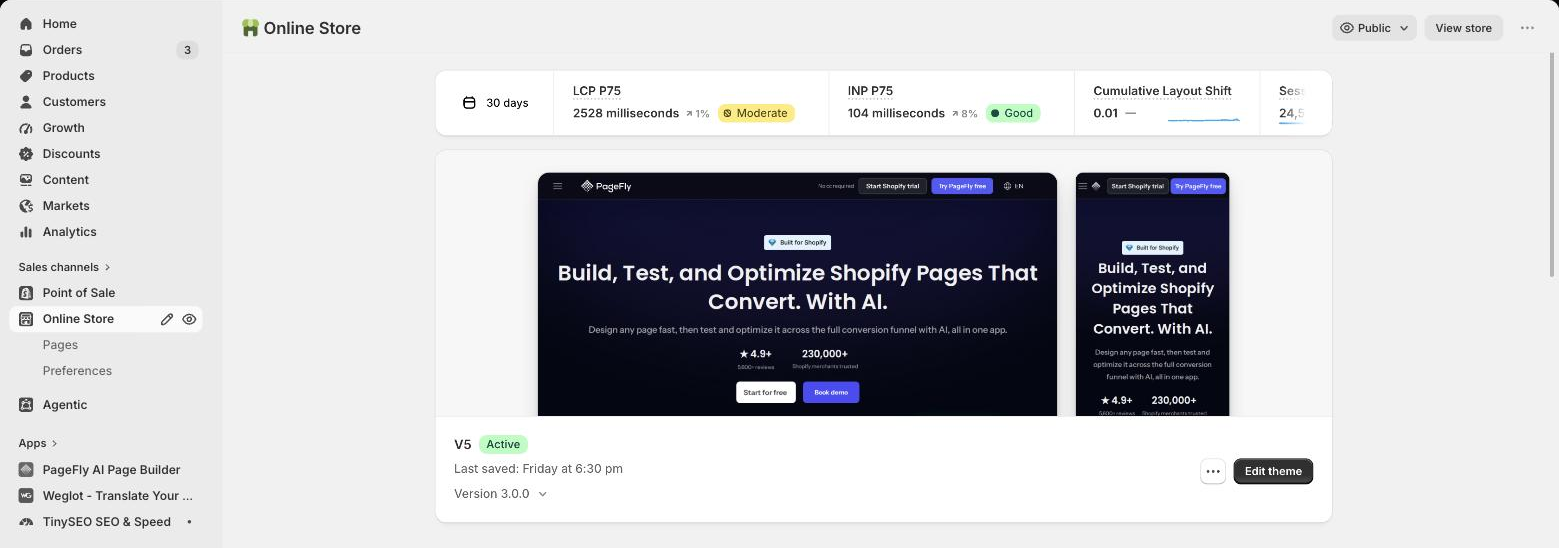
Step 3 — the Core Web Vitals card on the Online Store page in our own Shopify admin. LCP 2,528 ms is flagged Moderate; INP 104 ms is Good. Tested first-hand by PageFly, 8 September 2026.
Our own LCP is the weak metric, not our CLS — which is exactly the pattern Shopify's data predicts is worth fixing. Note also that /admin/online_store/speed no longer exists as a separate page; the data now lives on the Online Store screen alongside your themes.
The one speed claim to ignore
You will see "a 1-second delay costs 7% of conversions" in almost every BFCM article. It traces back to a 2008 vendor report with no retrievable primary source. Use Shopify's 2026 platform data instead, or measure your own store — both are checkable, and that one is not.
Prepare for AI assistants, not just Google
This is the gap. Across the highest-ranking BFCM guides, including Shopify's own, there is effectively no mention of AI shopping surfaces as a BFCM traffic source. Meanwhile the numbers moved sharply.
Adobe measured generative-AI traffic to US retail sites growing 693.4% year over year across the 2025 holiday season, and its AI traffic report found AI referrals converted 31% better than non-AI traffic overall, and 38% better on Black Friday itself. Salesforce put AI and agents as influencing 20% of all global Cyber Week orders.
For a Shopify merchant this is not theoretical, because it is already switched on. Shopify's help documentation states that Agentic Storefronts is active by default for eligible stores, covering ChatGPT, Google AI Mode and Gemini, Microsoft Copilot, and Meta. Where the checkout happens differs by channel, and that changes which of your pages the shopper actually sees.
| チャンネル | Where checkout happens | What that means for you |
|---|---|---|
| チャットGPT | On your store, in an in-app browser | Your product and cart pages still do the selling — and must work in a narrow in-app viewport |
| Google AI Mode / Gemini | In-channel, Shopify-powered | Product data and price accuracy carry the sale; your page may never load |
| Microsoft Copilot | In-channel, Shopify-powered | Same — feed quality over page design |
| Meta | In-channel, Shopify-powered | Same — feed quality over page design |
The split matters for where you spend the remaining weeks. For ChatGPT traffic your cart experience still decides the outcome; for the in-channel surfaces it is your product data, not your design.
Three concrete jobs before BFCM:
- Check your Agentic Storefronts page in the Shopify admin, which since May 2026 shows which queries you surface for.
- Make sure your product data is complete. Shopify Catalog is what these surfaces read; our guide to Shopify Catalog covers the fields that matter.
- Write your offer terms as plain, extractable text on the page. An assistant can only quote a discount, a deadline or a shipping cutoff it can actually parse. Getting your store recommended by AI assistants and our piece on agentic commerce go deeper.
One caution against the hype: Shopify has published no BFCM-specific agentic figures, and bot protection for scheduled drops remains a Shopify Plus feature that has to be requested from Plus Support, capped at 60 minutes per event. Plan for AI traffic; do not assume tooling exists that does not.
How to build your BFCM pages in PageFly
PageFly ships eight Black Friday page templates you can install and edit rather than design from scratch: Canvas Collection – BFCM and Fashion Collection – BFCM (collection pages), Curve – BFCM and Everywear – BFCM (product pages), Fashion Home – BFCM (homepage), and Stella, Teaser and Teki – BFCM (landing pages).
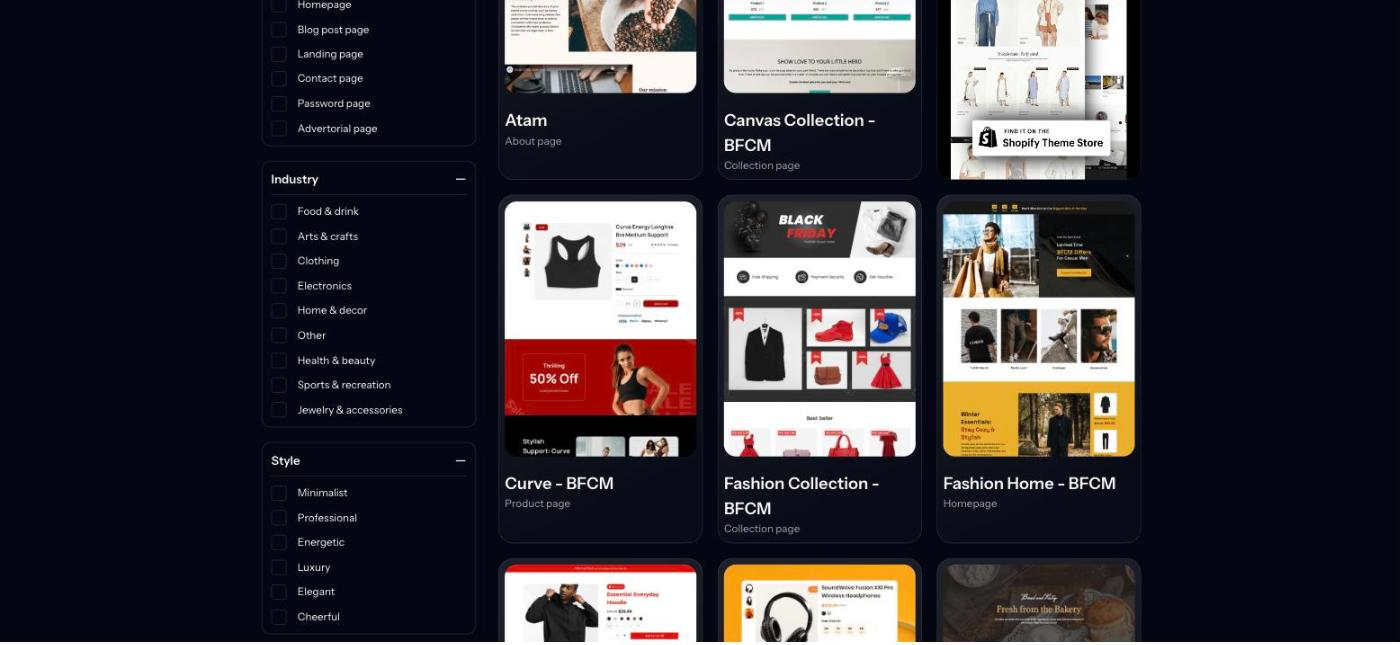
Step 1 — the BFCM templates in the PageFly template library. Tested first-hand by PageFly, 8 September 2026.
An honest limitation: there is no "Black Friday" or "seasonal" filter in the library. The filters are Page Type, Industry, Style and Features, so you find the BFCM templates by name rather than by filtering.
- Pick the template that matches the page type you need — collection for a deal grid, landing for a single hero offer.
- Edit the sections in the editor. The page outline on the left adds, reorders and removes sections without touching theme code, so your frozen theme stays frozen.
- Check every breakpoint. Mobile took 56.4% of online transactions last holiday season, per Adobe — the phone layout is the primary layout.
- Publish, then leave it alone. Preview first; the editor has a preview step before publish for exactly this reason.
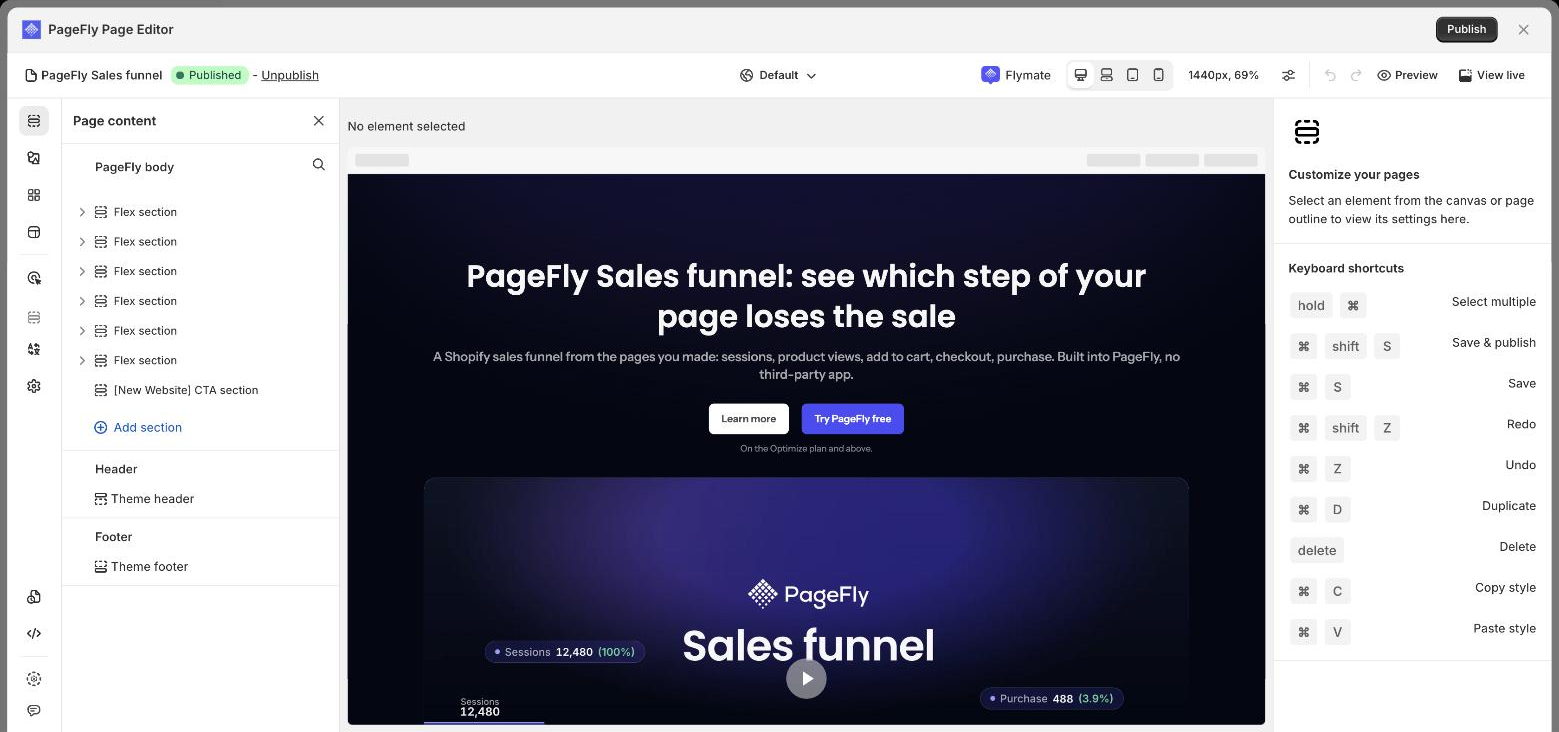
Step 2 — the PageFly editor. The Page content panel on the left is the section outline; the device icons at the top switch breakpoints. Tested first-hand by PageFly, 8 September 2026.
Pages built this way carry a per-page heatmap and A/B test toggle, which is what makes the post-BFCM review in the next section possible. The CRO tools page covers that testing side in more detail.
If you are still choosing tooling, Shopify page builders compared is the neutral starting point, and the PageFly plans page shows which tier includes A/B testing.
What to do after the weekend
The sale is a data-collection exercise as much as a revenue one. Within the week: pull conversion by page and by device, compare against the pre-sale baseline, and note which offer format actually moved. Cart abandonment sits at 70.22% on average across 50 studies per Baymard Institute, with extra costs the single largest fixable reason at 40% — if your BFCM abandonment was worse than your normal rate, shipping and fee presentation is the first place to look.
Then revert deliberately. Unpublish the sale pages, let Rollouts undo the scheduled changes, unfreeze the theme, and write down what you would do differently. Next year's checklist is best written while the weekend is still fresh, and your conversion rate baseline is the number to hold it against.
Shopify Bfcm Checklist FAQ
Black Friday 2026 is Friday, 27 November. Thanksgiving is Thursday 26 November, Small Business Saturday is 28 November, and Cyber Monday is Monday 30 November. BFCM refers to the five-day window running from Thanksgiving through Cyber Monday.
Start about 11 weeks out. Shopify's flash-sales guidance says to begin preparations weeks in advance without naming a number. In practice, the work that needs lead time is inventory forecasting, carrier cutoff confirmation and page-speed fixes that Google has to re-crawl, so September is the realistic starting point for a November sale.
No. Shopify's developer changelog states that all Shopify Scripts ceased to execute entirely on 30 June 2026, after editing and publishing were disabled on 15 April 2026. Any tiered discount, line-item promotion or shipping-rate rule that lived in Scripts must be rebuilt as a Shopify Function before you rely on it for a sale.
Per Shopify's checkout.liquid documentation, script tags were sunset on those pages for Plus stores on 28 August 2025 and for non-Plus stores on 26 August 2026. Tracking pixels, conversion tags and post-purchase upsell snippets pasted into the old additional-scripts box no longer run; they need to be rebuilt as web pixels or checkout app blocks.
Yes, on the same item since 15 July 2026. Shopify's changelog says you can now combine multiple product discounts on a single line item, which previously was not possible. You add tags to your discounts, set which tags are allowed to combine, and Shopify applies them automatically at checkout.
Shopify says special preparation is only needed if you expect tens of thousands of checkouts within a few minutes. For that case its guidance is to deactivate carrier-calculated shipping rates and use flat rates, set up a second payment provider, consider manual payment capture, and keep the password page ready as a kill switch that stops new checkouts while letting in-progress ones finish.
Yes, eight of them: Canvas Collection and Fashion Collection (collection pages), Curve and Everywear (product pages), Fashion Home (homepage), and Stella, Teaser and Teki (landing pages). There is no Black Friday filter in the template library, so you find them by name rather than by filtering.
Yes, and it is already switched on. Shopify's help documentation states that Agentic Storefronts is active by default for eligible stores, covering ChatGPT, Google AI Mode and Gemini, Microsoft Copilot and Meta. Adobe measured generative-AI traffic to retail sites growing 693.4% year over year across the 2025 holiday season, and Salesforce found AI and agents influenced 20% of global Cyber Week orders.