






PageFly AEO: Answer Engine Optimization for Your Shopify Store (2026)
PageFly AEO scores each Shopifyproduct page 0–100 for AI readiness, then fixes it — product schema and an on-page Q&A — inone click. It exists because of an uncomfortable finding:your product page is the page AI reads worst.
Adobe Digital Insights runs amachine-readability check across retail sites and scores each page type on how well an AI engine can actually parseit. Returns pages score 82%. FAQ pages score 80%. Homepages score 75%.Product pages score 66% — the lowest of every page type measured(Adobe, AI Content Visibility Checker). The page that takes the money is the page the machines struggle with most.
That gap is expensive now, not later. Trafficfrom AI sources to US retail sites grew 393% year over year in January–March 2026, and inMarch 2026 that AI traffic converted 42% better than non-AI traffic (Adobe Digital Insights). Shopifyreports AI-referred orders growing nearly 13x year over year, with AI-referred visitors convertingat nearly 50% higher rates than organic search (Shopify, Agentic-Ready Product Data).
要点
- AEO = answer engine optimization: making a page easy for AI assistants to read, cite andrecommend. SEO gets you a link; AEO gets you into the answer.
- PageFly AEO scores a product page 0–100 and sorts it into four bands, from “Notready for AI” to “Excellent”.
- Two fixes are one click: Product schema (the hidden data AI reads) and an on-page Q&Asection with FAQ structured data.
- The readiness check and the schema fix are free on every plan, including Free. Q&Ageneration costs 5 AI credits.
- You can test it: thetool opens your shopper question directly in ChatGPT, Google AI Mode or Perplexity so you can see whether youshow up.
What is AEO (answerengine optimization)?
AEO (answer engine optimization) is the practice of making a page easy for AI assistants to read,cite and recommend. Classic SEO optimises for a ranked list of blue links. AEO optimises for the moment an assistantskips the list and answers directly — naming specific products, with specific facts, from specific stores.
The mechanics are unglamorous. An AIassistant can only recommend a page it can actually parse: a machine-readable summary of the product (name, price,availability, brand, rating), concrete specifications rather than adjectives, a clear heading structure, described images, and crawlers that aren't blocked. AsPageFly's own AEO documentationputs it: when AI can't read your page, it recommends someone else's.
This is not a hypothetical channel any more.Shopify now sells directly through ChatGPT, Microsoft Copilot, Google's AI Mode and the Gemini app via Agentic Storefronts. If you wantthe wider strategic picture first, our guide to Shopify agentic commerce covers how those channels work.
“Shopify puts Fenty Beauty in the conversations shoppers are already having, guiding them before they even know where to look.”
— Sapna Shah Parikh, SVP Global Marketing and Digital, Fenty Beauty Brands (Kendo), quoted on
Why AEO matters forShopify stores right now
Three things changed at once, and theycompound.
The traffic is real and it converts. Adobe measured AI-sourced traffic to US retail up 393% YoY inQ1 2026, and 693% YoY over the November–December 2025 holiday season. That traffic behaves better thanaverage: 48% longer sessions, 13% more pages per visit, and a 42% higher conversion rate in March 2026.
The bar is completeness, not brand. An AI shopping agent decomposes a shopper's request —“insulated boots under $200 that ship to Canada” — into requirements, then filters hard onattributes. A product missing one of those attributes is not ranked lower; it drops out of the answer entirely. Thatis why complete product data beats a familiar logo here.
And the weakest link is the product page. Your product page is the page AI reads worst — 66%machine-readable against 80–82% for your FAQ and returns pages. Merchants have spent a decadeoptimising product pages for humans and almost no time optimising them for the second reader. That second reader nowbrings a third of the growth.
The strategy side of this — howassistants choose which store to name at all — is covered in our Shopify GEO guide. This article is the execution side: the tool that measures a single page and fixes it.
AEO vs SEO vs GEO:what's actually different
The three terms overlap and marketers usethem loosely. Here is the distinction that matters operationally.
| SEO | AEO | GEO | |
|---|---|---|---|
| Optimises for | A ranked list of links | Being read and cited inside a direct answer | Being recommended by generative engines overall |
| Unit of work | Keyword → page | A single page's machine-readability | Brand presence across the web |
| Main levers | Titles, links, content depth | Structured data, Q&A, specs, crawlability | Mentions, reviews, community, consistency |
| Success looks like | Position 1–3 | Your page is the cited source | Your brand is named unprompted |
| Where PageFly helps | The AEO tool in this article | Groundwork only — see the GEO guide |
In practice AEO is the subset you canactually control this week. GEO depends on what the rest of the internet says about you; AEO depends on what yourown page says about itself.
What PageFly AEO does
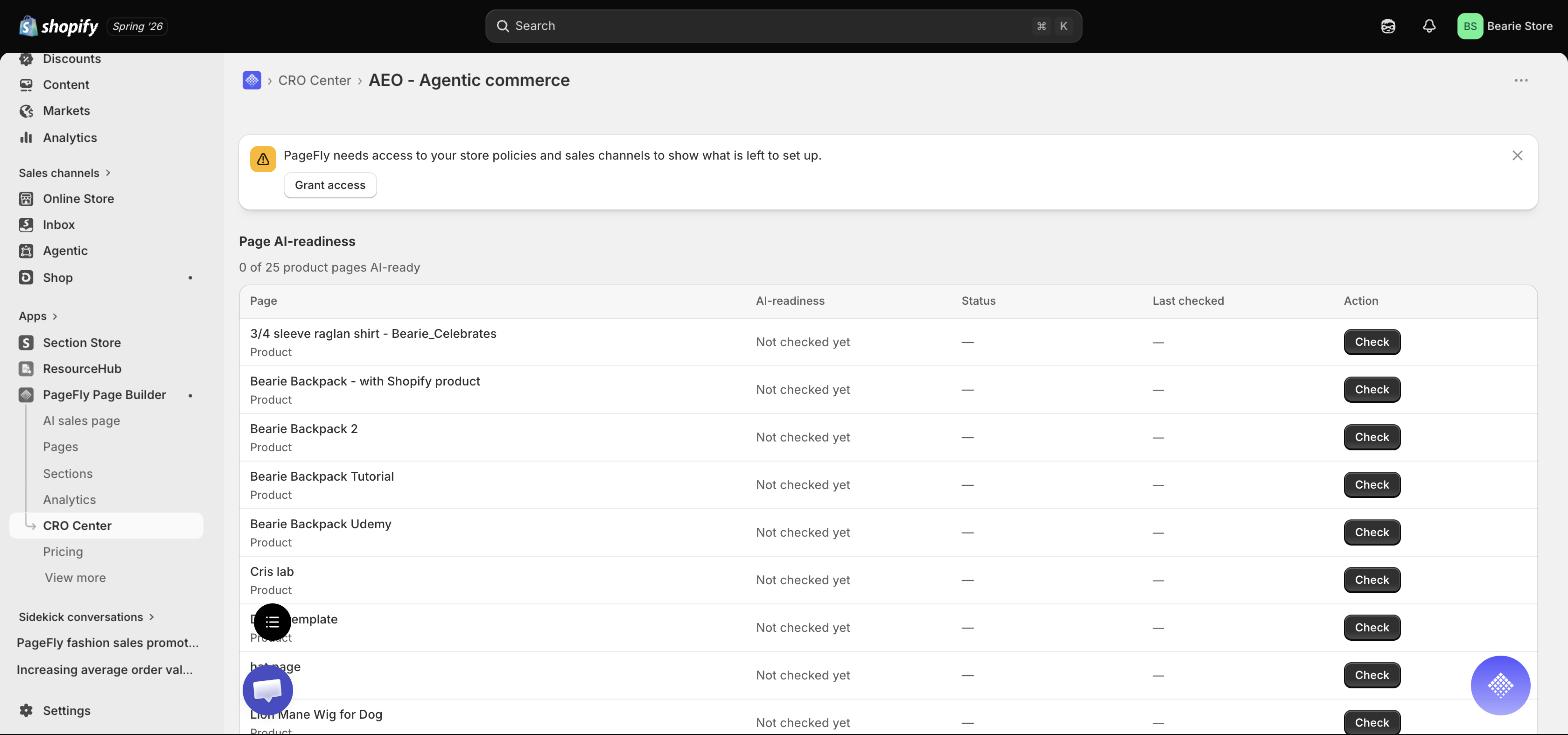
PageFly, a Shopify page builder, ships theAEO tool inside CRO Center → Optimize → AEO - Agentic commerce. It has four parts.
1. A readiness score. Openthe tool on a product page and it analyses the page and returns an AEO score from 0 to 100, in fourbands: 0–39 “Not ready for AI”, 40–69 “Partly ready”, 70–89“Good”, 90–100 “Excellent”. The dashboard lists every product page with its score,status and last-checked date.
2. One-click fixes. Twothings PageFly applies for you. Product schema writes the hidden Product JSON-LD — name,price, availability, brand, rating — that AI engines and Google read to understand your page. Shoppers neversee it. If your theme or another app already provides it, PageFly detects that and won't create a competingduplicate; you choose “Keep theme's” or “Use PageFly's anyway”. Every applied fix has aRevert.
3. An on-page Q&A generator. PageFly reads the page, writes shopper-style question-and-answerpairs, inserts them as a Q&A section and attaches FAQ structured data so engines can cite the answers. Pairs itcan fully answer are pre-selected; questions your page doesn't answer yet arrive as unchecked drafts with an“Add your answer” prompt — which doubles as a list of the gaps in your product copy. It writes inthe page's own language, and it needs at least 50 words on the page to work.
4. Tips, and a real test.Below the fixes sit plain-language tips for the things only you can do — add concrete specs, put them in atable, describe your images, fix your heading structure, unblock AI crawlers. Then the “Testyour page in AI” card lets you type the question a shopper would actually ask and open it straight inChatGPT, Google AI Mode or Perplexity to see whether you show up.
Score your first product page today
The readiness check and the product schema fix are free on every plan.
Install PageFly free →Already have PageFly? The tool lives at CRO Center → Optimize → AEO - Agentic commerce.
How to run AEO on aShopify product page
The whole loop takes about ten minutes on thefirst page and two on the ones after it.
- Open a PageFly product page. The tool works on product pages, so the page needs a Shopify product assigned to it. If none is assigned, PageFly asks you to pick one first. New to building these? Start with
- Go to CRO Center → Optimize → “AEO - Agentic commerce”. You can also open the AEO dashboard directly and hit Check on any row.
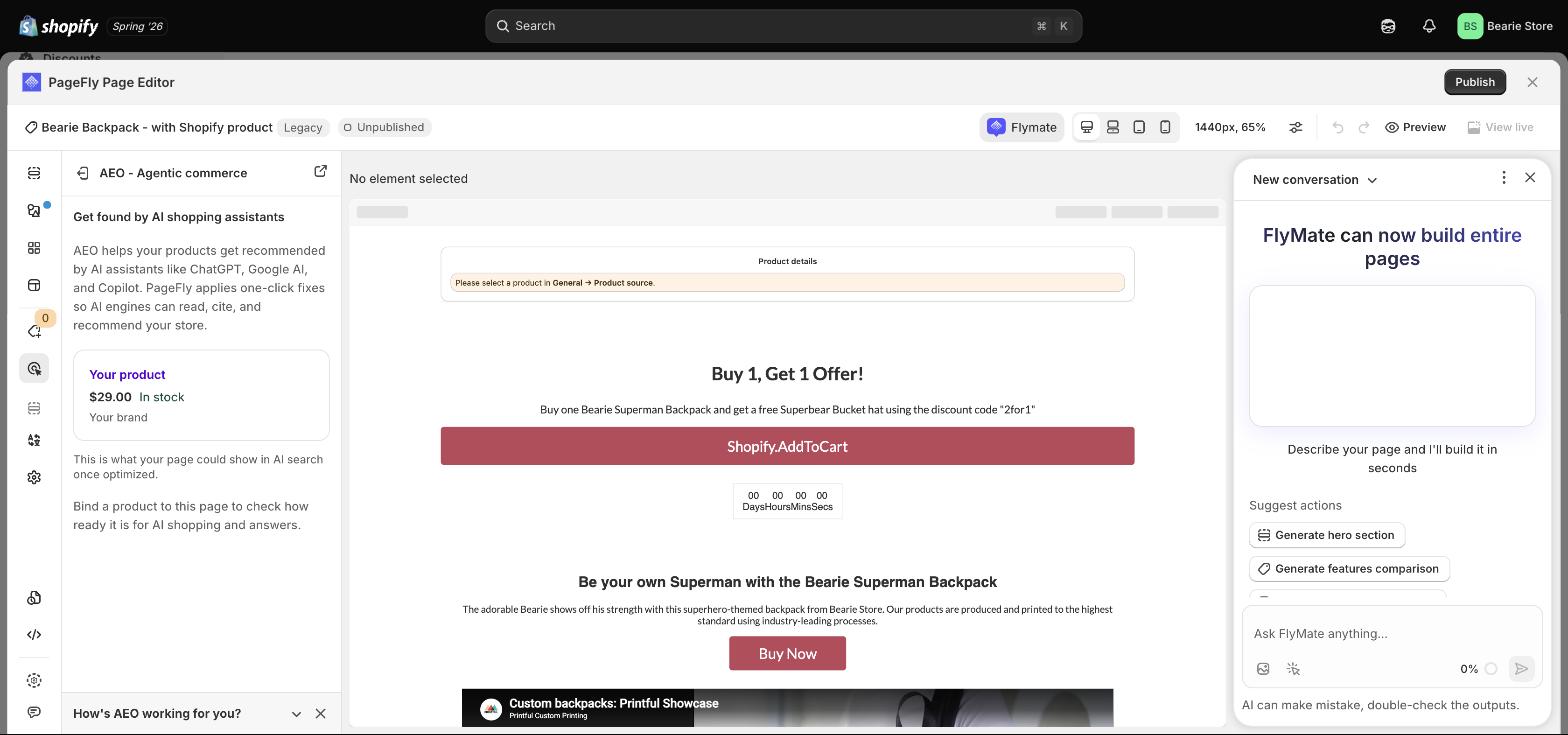
- Read the score, not the vibe. Anything under 40 means engines can't reliably read the page at all. You don't need 100 — a few fixes measurably improve your odds of being surfaced.
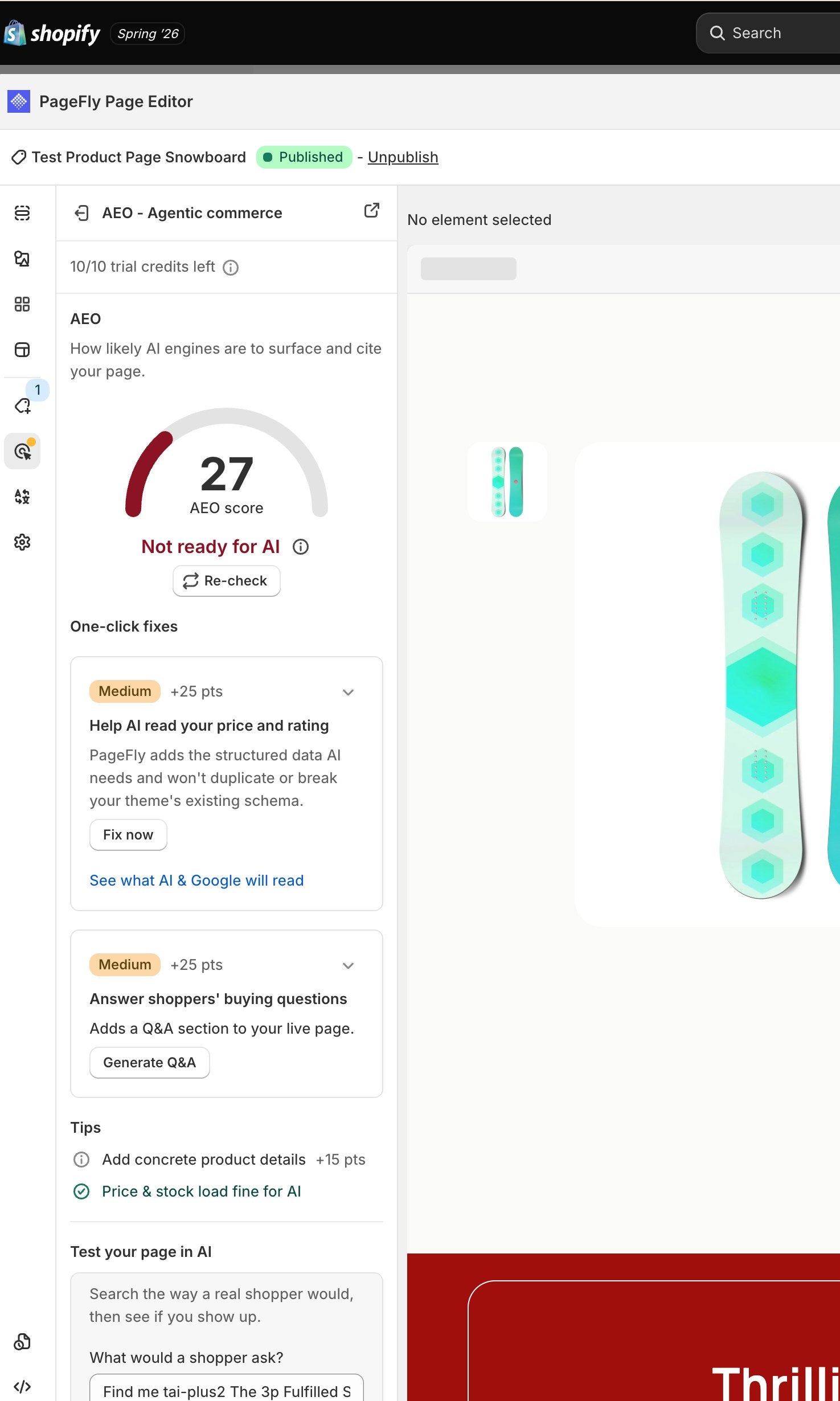
Step 3 — the AEO panel scores this product page 27 and labels it “Not ready for AI”. Each one-click fix below it is worth +25 points. Tested first-hand by PageFly. - Apply the product schema fix. Click Fix now, then publish the page — the fix only counts once it's live. The card flips from “Not published” to “Published”.
- Generate the Q&A. クリック Generate Q&A, review the pairs, edit anything that isn't quite true of your product, then Insert answered pairs. Save the page. Leave the draft questions unchecked until you can answer them properly — a wrong answer in structured data is worse than no answer.
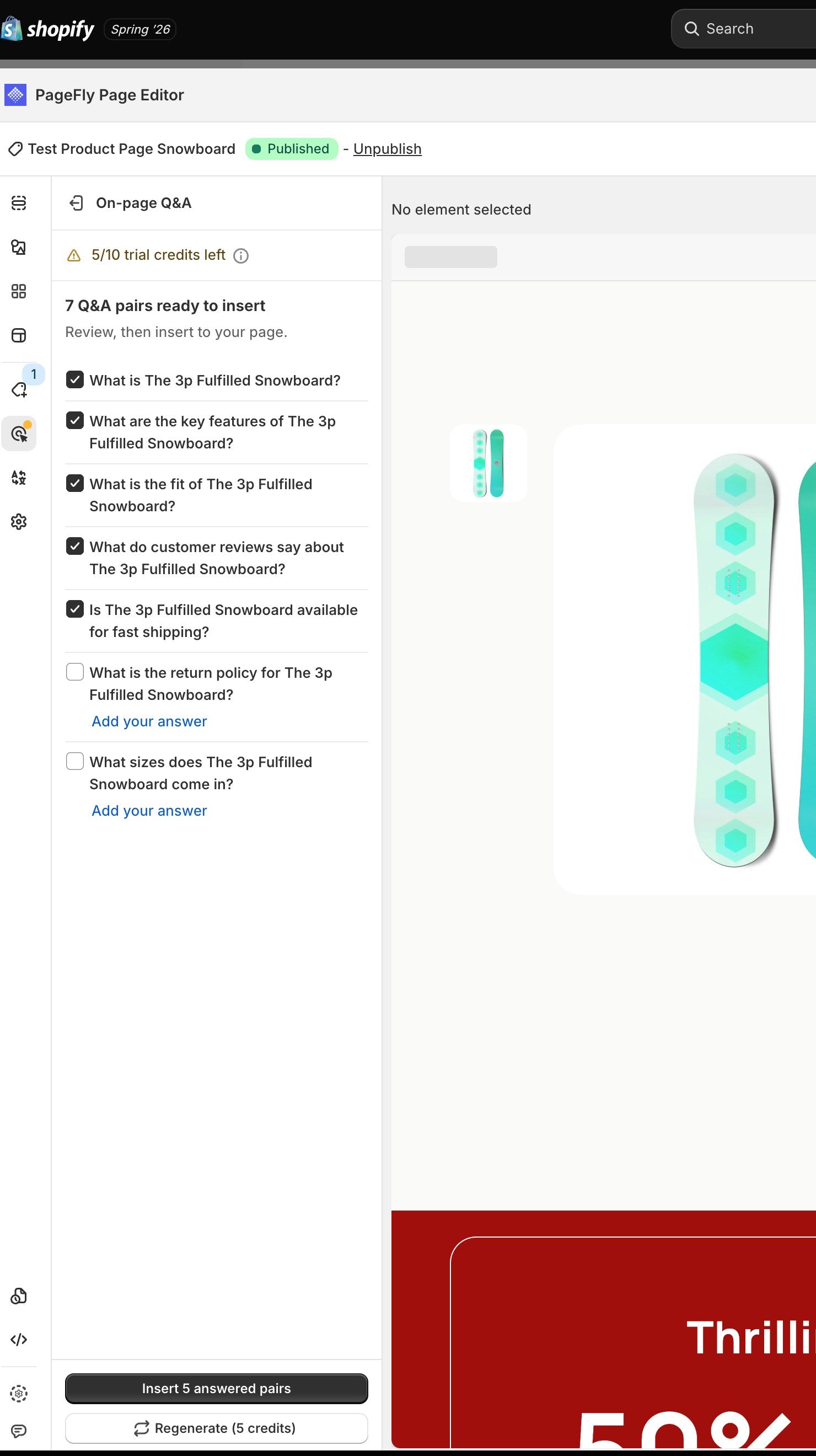
Step 5 — Generate Q&A returned 7 pairs on our test product, 5 of them already answered. The two it left blank were the return policy and the size range. Tested first-hand by PageFly. - Re-check. Schema counts when you publish; Q&A counts when you save. If Re-check is greyed out, you have an unsaved Q&A change.
- Test it in a real engine. Use the Test in AI card, in an incognito tab. Not showing up immediately is normal — engines re-crawl on their own schedule.
- Nudge the crawl. Once your schema is live, the tool offers IndexNow to tell Bing and other engines to re-crawl. That speeds up Bing-powered assistants like ChatGPT Search and Copilot. It does not affect Google.
Repeat on your best sellers first. The pagesthat already earn organic traffic are the pages where a citation is worth themost, and the same logic that drives strong product page design applies here.
Which plan do you need,and what does it cost?
The honest answer is that the expensive partis free. Here is every constraint worth checking before you start.
| Question | 回答 |
|---|---|
| Readiness check / score / re-check | Free on every plan, including Free |
| Product schema fix and Revert | Free on every plan |
| Generate or regenerate Q&A | 5 AI credits each time |
| Free and Builder plans | One-time AEO trial of 10 credits, valid 7 days — enough for two Q&A generations |
| Optimize plan and above | No trial pool and no gating; Q&A draws 5 credits from your main AI balance |
| Page types supported | Product pages (a Shopify product must be assigned) |
| Minimum content | 50 words on the page before Q&A can generate |
| Skill level | No code. The schema is written for you; the tips are plain language |
| Theme compatibility | Works alongside your theme — PageFly detects existing product schema and won't duplicate it |
| Time to results | Days to weeks. Engines re-crawl on their own schedule; IndexNow speeds up Bing-powered assistants only |
| Multi-product pages | The score is for the page; schema fills in whichever product the page is showing |
Current PageFly pricing is on the pricing page.
If you are weighing up the app more broadlyrather than just this feature, our visual editor overview is the shorter read.
How to tell whether AEOis working
Three signals, in increasing order of howmuch they matter.
The score. The cheapestsignal, and the only one that responds the same day. Useful as a build check, not as a business metric.
The engine test. Ask yourshopper question in ChatGPT, Google AI Mode and Perplexity, in incognito. Each engine answers differently andanswers vary between sessions, so treat it as directional. Our comparison of Sidekick vs ChatGPT vs Claude covers how differently theseassistants behave.
Actual arrivals. The onethat pays. In GA4, look at Traffic acquisition and isolate the AI Assistantchannel — referrals from chatgpt.com, perplexity.ai, gemini.google.com, claude.ai and copilot.microsoft.com.That number, not the score, is the scoreboard. Compare a 14-day window after your changes to the 14 days before.
One caveat worth stating plainly: the AEOtool improves how readable your page is. It cannot make an engine cite you, and nobody's tool can. What it removesis the failure mode where you were never eligible to be cited in the first place.
Agentic Commerce: theother half, and where it lives
Below the AEO fixes there is anAgentic Commerce section, and it is worth understanding what it is not. Getting your productslisted for AI shopping agents through Shopify — ChatGPT, Copilot, Gemini — is configured inShopify, not in PageFly. PageFly shows you the status and hands you off: aShopify Catalog readiness card that reads Active when your products are listed, or a to-do list andan Open Agentic settings button when setup remains. To read your store policies and channels itwill ask you to Grant access first.
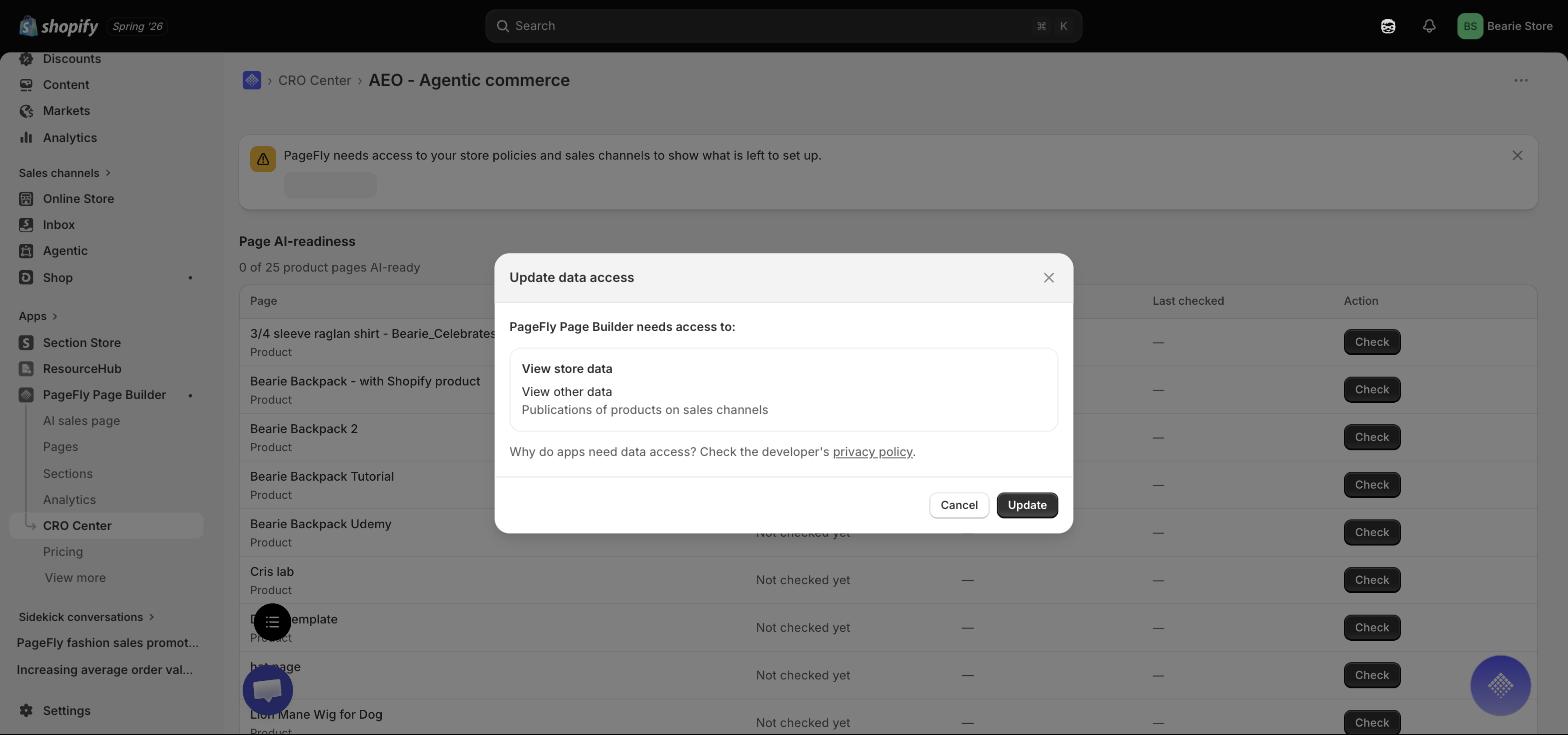
So the split is: PageFly's AEO tool scoresand fixes how readable a page is on the open web; Agentic Commerce is Shopify's own product listing for AI shoppingagents. You want both, and they are configured in different places. Shopify's guidance on agentic-ready product data coversthe catalogue side.
One more lever most merchants miss: theQ&A you add covers a single page. To help assistants answer broader questions about policies, shipping and yourbrand, fill in Shopify's Knowledge Base too. That is the store-level equivalent of what AEO does page by page— and it pairs with the work in onsite search and discovery.
Where to start this week
Pick your three best-selling products. Scorethose pages. Apply the schema fix and publish. Generate the Q&A, keep only the pairs you can stand behind, andsave. Then note today's GA4 AI Assistant number so you have something to compare against in two weeks.
That is roughly thirty minutes of workagainst a channel growing 393% a year. The rest of the feature set — from cart drawer to PageFly inside Shopify Sidekick — is built on the sameidea: the store should be legible to whatever is reading it.
Find out what AI actually sees on your product page
Free readiness check, free schema fix, no code.
Install PageFly free →Already have PageFly? The tool lives at CRO Center → Optimize → AEO - Agentic commerce.


