





A new wave of AI builders — Lovable, v0 by Vercel, and Replit — can stand up a working Shopify storefront from a single prompt, then hand you a real store that takes real orders.
The speed is real: AC Hampton of Supreme Ecom told Shopify that a store that used to take him five to seven days to build now takes 30 minutes with AI. But a storefront that exists is not the same as a storefront that sells — and that gap is where most AI-built stores quietly stall.
This guide walks through each of the three most-searched AI builders hands-on — how to connect them to Shopify, what each step actually looks like, and what to do after the AI is done so your site converts visitors into customers.
What is an AI-built Shopify site?
An AI-built site is a storefront generated by an AI app builder from natural-language prompts instead of hand-written code or a drag-and-drop theme editor. You describe the store you want ("Build an e-commerce store for handmade scented candles"), and the tool writes the front-end, wires it to a backend, and — in the case of Lovable, v0, and Replit — connects it to Shopify so Shopify handles payments, inventory, checkout, and fulfillment.
This is the practical form of what people now call vibe coding: building software by describing outcomes to an AI rather than writing every line yourself. For a deeper look at the trend and how it compares to a visual page builder, see our companion guide, Vibe Coding vs PageFly: How to Build a Shopify Store with AI.
The important nuance: these tools build a headless or custom storefront (a front-end that talks to Shopify’s APIs), and they create a development/sandbox store first — a safe environment that does not process real payments until you claim it and activate Shopify Payments. Understanding that two-stage flow (build → claim → sell) is the key to launching without surprises.
Is building a Shopify store with AI legit? Shopify thinks so
This is not a fringe workaround. In its Winter ’26 Edition, Shopify officially highlighted "Vibe code with Lovable" — spinning up a Shopify store with Lovable that "includes products, inventory, analytics, checkout, and more." Shopify also shipped its own AI store builder that generates a custom store from a description (even before you create an account), plus Sidekick, its built-in AI assistant that can build themes, blocks, segments, and apps from prompts.
The takeaway: AI-assisted store building is now first-party-endorsed. Third-party tools like Lovable, v0, and Replit give you more design control and live alongside Shopify’s own AI — so the question is no longer "should I?" but "which tool, and how do I make the result sell?"
The 3 AI builders that connect to Shopify (compared)
All three turn a prompt into a storefront, but they differ in how they create the store, how you go live, and who they suit best.
| Lovable | v0 by Vercel | Replit | |
|---|---|---|---|
| How the store is made | Creates a new Shopify sandbox store or connects your existing store | Creates a Shopify store from Vercel; builds the storefront with v0 | Replit Agent provisions a Shopify dev store (no API keys) and builds a custom storefront |
| Where it deploys | Published Lovable project (lovable.app or custom domain) | Vercel (headless Next.js storefront) | A domain you deploy to from Replit |
| Connect an existing store? | Yes (account email must match the Shopify store owner’s email) | Yes (via the Shopify integration) | Built around new dev stores (one store per app) |
| Go-live step | "Claim" the store → 30-day Shopify trial → activate payments | Claim the test store → activate payments | Claim the store in Shopify → activate payments |
| Editing after build | Natural-language prompts in chat | Prompts + code in the Vercel/v0 workflow | Natural-language chat with the Agent |
| 最適 | Non-technical founders who want a full store from chat | Teams comfortable with Next.js / headless | Builders who want store + code in one place |
| Free tier | Free plan ($0, ~30 credits/mo); Pro from $25/mo | Free tier + credit-based paid plans | Free Starter; Core $20/mo; Pro $95/mo |
Sources: official Lovable, Vercel, and Replit documentation. Pricing changes often — confirm current plans on each vendor’s site before you commit.
A practical rule of thumb: Lovable is the most beginner-friendly path from prompt to full store, v0 suits teams that want a fast, headless Next.js storefront on Vercel, and Replit is for people who want the store and its code living together. Whichever you pick, the Shopify half of the setup — claiming the store and turning on payments — is nearly identical.
How to launch a store with Lovable on Shopify
Lovable integrates directly with Shopify so you can create a new store or connect one you already own, then build and launch in natural language. Walking through it, the Shopify connection prompt appears the moment you mention Shopify in your first prompt — here’s the flow from Lovable’s official documentation:
- Start a project. Tell Lovable what you want and name Shopify explicitly — for example, "Build an e-commerce store with Shopify for selling handmade scented candles." You can also remix one of the ready-made Shopify templates on Lovable’s e-commerce landing page to start faster.
- Create a new store or connect an existing one. When prompted, click Allow to enable the Shopify connection, then choose your setup. For a new store, pick your country (this sets your currency) and Lovable spins up a sandbox store at no Shopify cost. To connect an existing store, your Lovable account email must match the Shopify store owner’s email — a mismatch is the #1 reason the connection fails.
- Add products and images. Prompt the Agent with a product name, description, and price, then enhance listings with AI-generated images, your own uploads, or images from a URL.
- Manage the store from chat. Update prices and descriptions, create collections, add discount codes, or build a reviews/wishlist feature — all by typing requests.
- Claim your store (new stores only). A sandbox store is for building only — to take real orders you must claim it. Type "Claim the store"; Lovable opens Shopify in a new tab (you may also receive a claim email). Sign in or create a Shopify account, accept the claim link, and the store migrates to your Shopify account with you set as the owner. Claiming starts a 30-day free Shopify trial. Then, inside Shopify admin, complete identity verification (KYC) and turn on Shopify Payments so the store can accept money. Only claim when you’re genuinely ready to launch — after the trial you’ll need a paid Shopify plan to keep selling.
- Launch. Publish your Lovable project. Your live store URL becomes your lovable.app address or a custom domain you connect.
The catch worth repeating: a sandbox store won’t take real money until it’s claimed and payments are active, and the paid Shopify plan after the trial is billed by Shopify, separate from your Lovable subscription.
How to build a Shopify storefront with v0 by Vercel
v0 is Vercel’s AI builder, and Vercel offers a native Shopify integration so you can go from prompt to a deployed, production-ready storefront without leaving the Vercel ecosystem. Shopify even maintains an official v0 profile (@shopify) with a ready-to-fork "Building a storefront" template — a Next.js + Shopify Storefront API starter you can remix as your starting point.
- Install the Shopify integration. Add Shopify from the Vercel Marketplace, v0, or the Vercel CLI. This automatically configures your Shopify credentials in Vercel.
- Spin up a test store. You can create a free Shopify test store in seconds and claim it later when you’re ready to go live.
- Build with v0. Generate your storefront UI from prompts, or start from the official Shopify template above. The integration works natively with v0 (and other AI coding tools), so you can iterate on layout, product pages, and components conversationally.
- Deploy on Vercel. The Next.js Commerce template connects your Shopify store to a Vercel deployment; deploying prompts you to connect your storefront. The result is a headless Shopify storefront served from Vercel’s infrastructure.
- Go live. Claim the Shopify store, activate Shopify Payments, and point your domain at the Vercel deployment.
Because v0 produces a headless Next.js front-end, it’s the most flexible of the three for custom design and performance — but it assumes more comfort with code and the Vercel workflow than Lovable or Replit.
How to launch a store with Replit on Shopify
Replit’s Agent can design and launch a custom Shopify storefront entirely from a conversation — Replit reports roughly 10 minutes from the first prompt to taking real orders. Most of the work happens inside Replit; you only visit Shopify once to claim the store and switch on payments. Here’s each step, with Replit’s own walkthrough screens:
- Tell Agent what you want to sell. Start a project and describe your store. You can name Shopify explicitly, but Agent also recommends Shopify on its own when you describe selling a physical good, then walks you through creating a new Shopify store right in the chat.
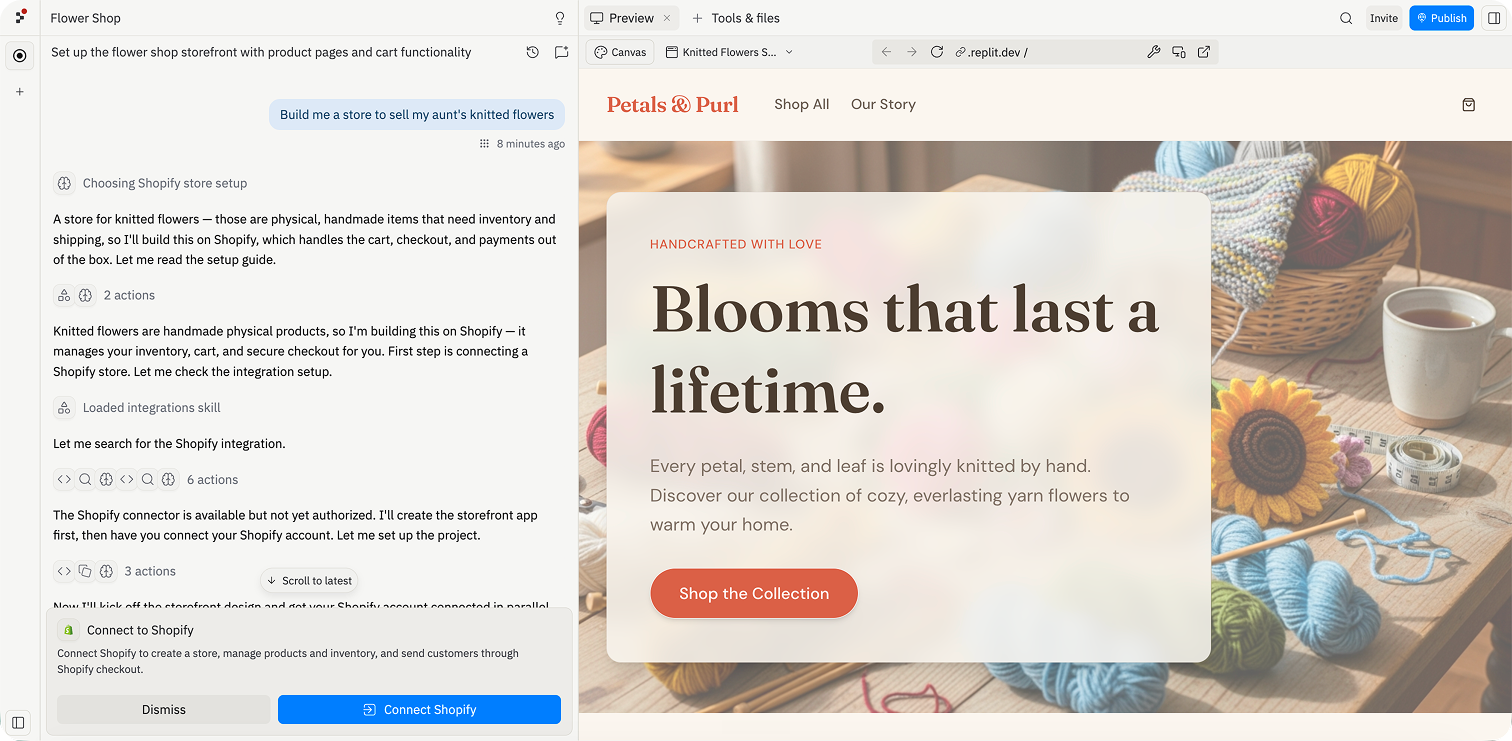
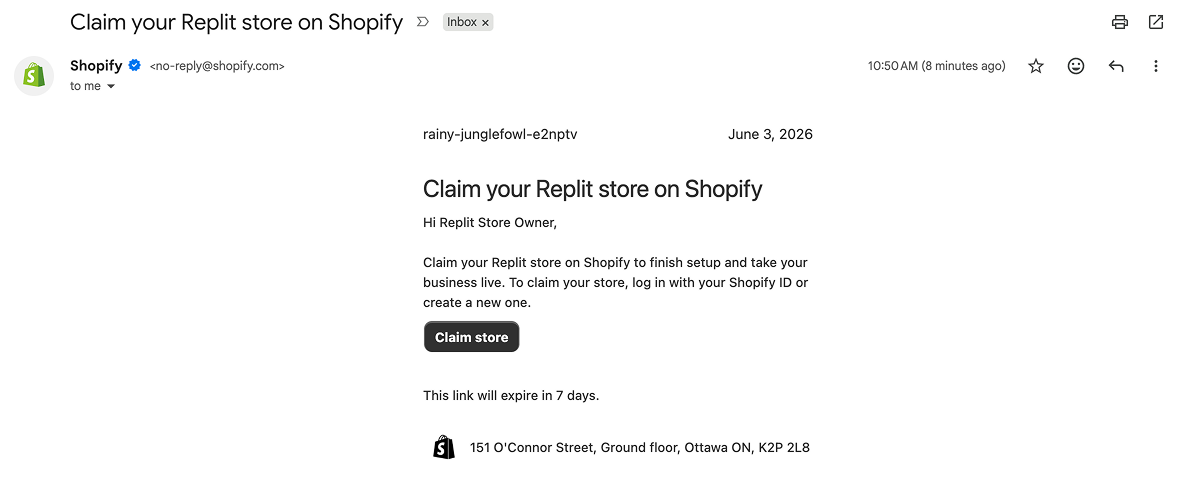
- Claim the store and set up Shopify. A link to claim your store appears in chat and is emailed to you. Open it, create or sign in to your Shopify account, claim the store Agent built, set up payments, and publish — then return to Replit and stay there. A development store is created in about ten seconds under Replit’s Shopify Partner account (the Replit Sales Channel app is installed automatically, with no API keys, one store per app).
- Let Agent build your storefront. With the store claimed and connected, Agent designs and builds the storefront against it. Copy, layout, animations, product pages, and navigation are all editable through conversation — ask Agent to change something and it does.
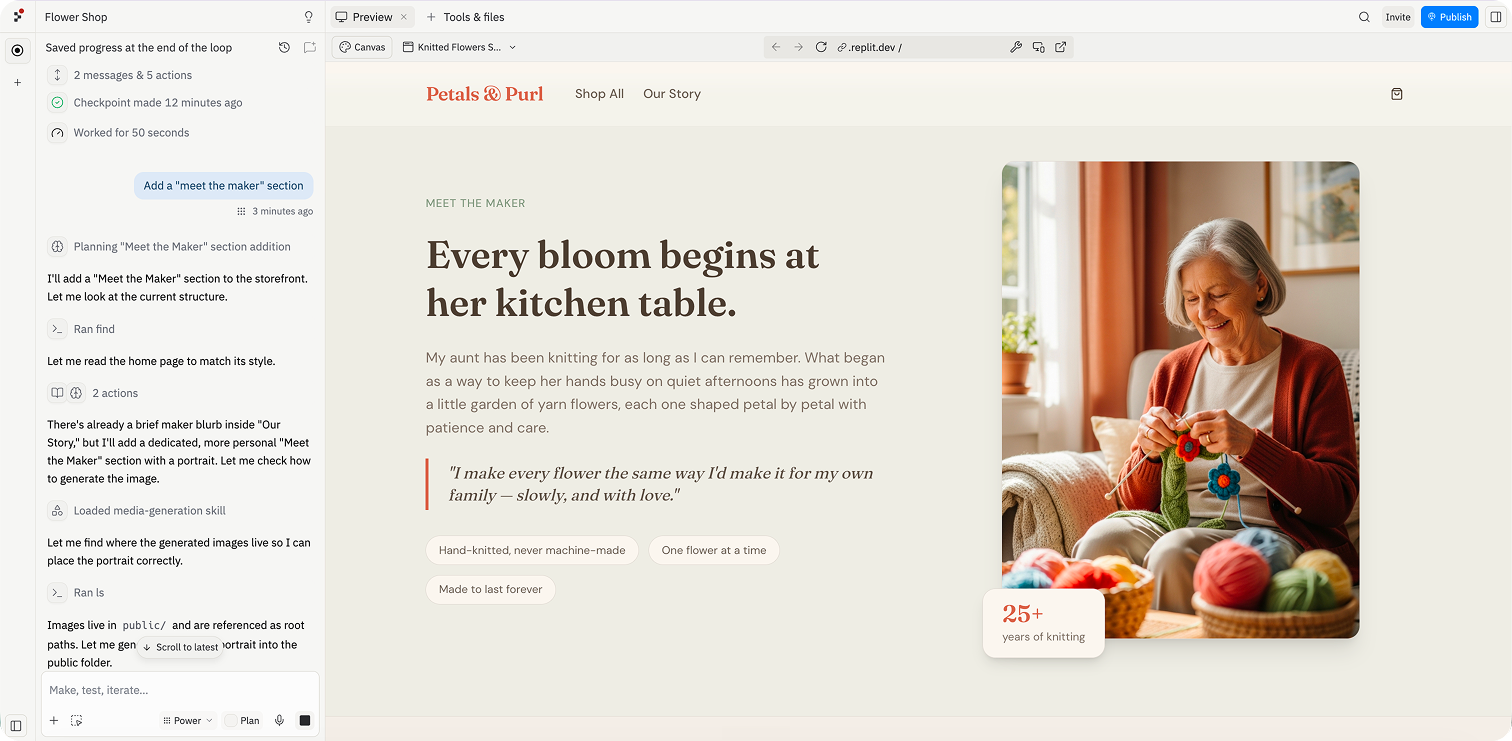
- Manage products and refine from Replit. From here you stay in Replit: create listings, update names, descriptions, prices, and images, or launch a new collection. Shopify handles checkout, inventory, and order management in the background.
- Deploy to a domain. Use Replit to deploy your storefront to a live domain — your store, your domain, owned by you.
One important boundary: orders, refunds, payouts, and fulfillment are handled in your Shopify admin, not through the Agent — so your day-to-day operations still run on Shopify’s standard tools.
How to make your AI-built site actually sell
Here’s the part most "build a store with AI" guides skip. AI gets you to a launchable store fast, but launch-ready and conversion-ready are different things. Across the board, the founders Shopify interviewed described the same pattern: let AI do the heavy lifting, then own the last mile yourself. As AC Hampton of Supreme Ecom told Shopify, the one thing he won’t hand to AI is the emotional core of his marketing: "Pain points, desires, real feelings — you can’t make that up. That’s where I don’t let AI touch."
That "last mile" is conversion. A few high-leverage moves after the AI is done:
- Tighten the offer and copy. AI drafts generic product descriptions and headlines. Rewrite them around a real customer’s pain point and desired outcome — the part AC Hampton keeps human. See our Shopify product page SEO guide for how to do this in a way that also ranks.
- Make key pages editable without re-prompting. Re-generating a whole AI page just to move a button or swap a hero image is slow and risky. A visual editor lets you change layout, sections, and content directly. See how PageFly’s visual editor works for editing pages with no code.
- Build dedicated landing pages for your traffic. Your homepage rarely matches the intent of a specific ad or campaign. Purpose-built landing pages convert paid and social traffic far better — our guide to building a high-converting Shopify landing page walks through the structure.
- Test before and after launch. Shopify’s Winter ’26 Edition added two native ways to de-risk this: the Shopify SimGym app, which simulates shopper behavior with AI agents trained on billions of purchases and flags issues before you go live, and Rollouts, which lets you schedule theme changes and run A/B tests from the admin. Pair them with our Shopify conversion rate playbook once real traffic arrives.
- Get found by AI shoppers, too. With Shopify Agentic Storefronts (also new in Winter ’26), you set up your product data once and Shopify surfaces it inside ChatGPT, Copilot, and Perplexity — a fast-growing channel. Our explainer on how agentic commerce works covers how to prepare for it.
The mental model: AI builds the storefront; you optimize the selling layer. PageFly is the no-code editing and CRO layer that sits on top of your Shopify store after the AI hands it off — so you can keep improving conversion without re-generating the whole site or hiring a developer.
Common mistakes to avoid
- Treating the sandbox as live. A new AI-created store is a development store that won’t process payments until you claim it and activate Shopify Payments. Test the full checkout before you drive traffic.
- Forgetting the Shopify subscription. After the 30-day trial, you need a paid Shopify plan to keep selling. That’s billed by Shopify and is separate from your Lovable, Vercel, or Replit subscription.
- Shipping AI’s first draft of the copy. Generic, AI-sounding product pages erode trust. Edit them in your own voice and anchor them to a real customer problem.
- Skipping the conversion layer. A beautiful AI-built homepage with no dedicated landing pages, no clear offer, and no testing will look great and still not sell.
- Connecting the wrong account. With Lovable, connecting an existing store fails if your Lovable email doesn’t match the Shopify store owner’s email — fix this first to avoid a frustrating dead end.
Lovable Shopify FAQ
It depends on your skill level. Lovable is the most beginner-friendly path from a single prompt to a full store; v0 by Vercel suits teams that want a headless Next.js storefront; Replit is best if you want the store and its code in one place. All three connect to Shopify for payments and inventory.
Yes. Shopify featured “Vibe code with Lovable” in its Winter ’26 Edition and offers its own AI store builder and Sidekick assistant. Lovable, v0, and Replit connect to Shopify’s commerce backend, so checkout, payments, and orders run on Shopify.
Yes for Lovable (your Lovable account email must match the Shopify store owner’s email) and for v0/Vercel via the Shopify integration. Replit is built primarily around creating new development stores, one per app.
Not at first. Lovable, v0, and Replit create a development/sandbox store that can’t take real money. You go live by claiming the store and activating Shopify Payments — after which a paid Shopify plan is required once the trial ends.
Yes, because the commerce backbone — checkout, payments, orders, fulfillment — runs on Shopify, not the AI tool. The AI generates the storefront; Shopify handles the regulated, money-moving parts in your admin.
Often, yes. AI is great for the initial build, but ongoing edits, dedicated landing pages, and conversion testing are easier in a no-code visual editor than by re-prompting an AI each time. A page builder like PageFly is the layer you use to keep improving conversion after launch.
Building the storefront can take minutes — Replit reports about 10 minutes from prompt to first order, and founders Shopify interviewed cut store builds from days to around 30 minutes. Going live still requires claiming the store, completing Shopify’s verification, and activating payments.
Mention Shopify in your first Lovable prompt and click Allow when the connection prompt appears, then either create a new sandbox store or connect an existing one — your Lovable account email must match the Shopify store owner’s email. From there you add products and manage the store from chat, and claim the store to activate Shopify Payments when you’re ready to sell.